發表文章

目前顯示的是有「Ruby on Rails」標籤的文章

Mar 2026【隨筆】Clone a Meta Ray-ban Display glasses application|藍芽 L2CAP CoC 極致低延遲架構優化:實現 720p 智慧眼鏡流暢串流 👓(LIVE DEMO)

圖片
最近在做一些實驗性質的東西,記得去年短暫玩過 2023 年底上市的第二代 Ray-Ban Meta 智能眼鏡,雖然它主要還是依賴智慧型手機作為算力中心,但我們對它所使用的串流技術很感興趣,因為聽說他們是用藍芽做串流。 去年曾經有同事隨口問我:「我們的眼鏡做到跟他們一樣你覺得有可能嗎?」,因為我知道我們的硬體規格跟人家的相比並非等號,加上當時有其他事情在搞,所以隨口開玩笑回說:“可是聽說 Meta 有200個人在搞那個眼鏡捏(雖然不知道他們負責搞應用的有幾人),啊我如果一個人可以幹贏他們200人,那我還在這幹嘛???(笑)” 也記得更久以前,當我們還在研究那個眼鏡時,常聽到像是:『 他們不知道用了什麼黑科技 』,這類沒有建設性、不應該從 RD 嘴裡說出來的話,而我也是不以為然。坦白講,以前每次只要聽到某SW嘴砲經理(暫且以H君稱之),沒事就把『 黑科技 』三個字掛在嘴上,當做無知的遮羞布,我就會感到倒胃口!同樣身為RD,我只覺得  Shame on you!(打嘴炮、作秀搶風頭、噁心帶風向、搞政治操作、把別人做事的成果搶去幫自己抬轎、有鍋直接推給下屬扛、散佈同事私生活謠言,還有職場霸凌,這些你他媽都頂級專業戶,除此之外沒啥洨用了!) 一件理論上可以做到的事情,外行人的認知被信息差,不懂加上沒實作能力去驗證,就什麼都變成黑科技了(多黑?比巴西黑鮑魚還黑嗎?)。反重力技術說不定也非啥黑科技,只是政府不讓你普通老百姓了解罷了。 Ray-ban Meta 的黑科技,講白了就是人家拉個百人團隊在搞那支眼鏡,然後把軟體技能和硬體規格點滿,再加上極致優化後的成果罷了! 當時知道 Ray-Ban Meta 的智慧眼鏡有塞入一個強大的 WiFi 6 晶片在裡面,一開始我猜測會不會有可能是透過 WiFi P2P 或 WiFi SoftAP 的方式去做串流(確實 Meta 的智能眼鏡,在同步媒體時,會強制要求開啟手機的 WiFi 開關,所以媒體同步應該是靠 WiFi 通道做的),而去年初我也快速做了一個WiFi Direct 架構來做 POC,確實傳輸效率非常快,幾百 MB 的大檔幾乎秒級傳完,從眼鏡端將媒體串流到手機端更是不用說的順暢,而且當時我們的媒體串流還是以未經編碼的方式傳透過 Socket 直接傳輸的(這表示傳輸時所需的頻寬會更大,功耗據說也較大)。 後來因為 ...

【筆記】Sending Push Notifications from Rails back-end to an iOS App— To keep your user engaged with app

圖片
Apple Push Notification Service (簡稱  APNs ) 是 Apple 公司在 2009 年的 iOS 3.0 版本時所發布的一項平台服務,透過這項服務,第三方應用程式的開發人員,只需要獲取憑證,並寫一些程式碼,就可以發送通知給 iOS 裝置上的 App 用戶! 要在 iOS client app 和 back-end server 之間實現  Push Notification ,首先必須擁有一個付費的  Apple 開發人員帳號 ,以建立 憑證 (Certificates) 。 然後在 Xcode 開發環境中,授權   Notification  權限給你的 App。最後是取得  .p12 憑證檔案 (這是一個包含私鑰的憑證,可以讓 Apple 解譯你的信息)。 首先,請按以下步驟來獲取 .p12 憑證檔案: 1. 登入  Apple developer account  並點選  Certificates, Identifiers and Profiles 2. 在頁面中選擇App所使用的AppID,然後點選 Edit 進入。裡面可以看到一些 Services 的狀態,找到  Push Notifications 項目並勾選它。接著點選 Create Certificate ,之後你會看到一個上傳  .certSigningRequest 檔案的頁面。 這裡有兩種不同的憑證: Sandbox (Development) certificate 和 Distribution (Production) certificate ,我們可以在不同的環境下使用不同的憑證。 3. 請在 Mac 電腦上執行 Keychain Access 應用程式,選擇 鑰匙圈授權 -> 憑證輔助程式 -> 從憑證授權要求憑證 ,在下一個視窗中,輸入你的 Email ,並勾選 儲存到磁碟 ,你的電腦上就會有  .certSigningRequest  這個檔案了。 4. 從電腦上選擇剛才產生的  .certSigni...

FbGraph + OmniAuth + Facebook Graph API on Rails application

圖片
OAuth is often described as a 'valet key for the web'. In the same way as a valet key gives restricted access to a car, allowing the valet to drive it but not open the trunk or glovebox, OAuth allows a client application restricted access to your data at a resource server via tokens issued by an authorization server in response to your access grant. Facebook Platform uses the OAuth 2.0 protocol for authentication and authorization. Suppose your Rails application allows users to share content with their Facebook friends. To support this, a connection needs to be established between a user's local account and her Facebook account. Once established, a Facebook instance can be obtained and used to post content to the user's wall. The basic idea is to store the access_token during an OAuth2 login process and later on use the token to fetch more data. The last days I was working on letting user sign-up/sign-in using Facebook account. I'm planning to integrate some so...

Connect to the Foursquare API via OAuth in your Rails application

圖片
OAuth  is an open authentication protocol that allows secure API communication without the necessity of continually passing a username and password with each request. The idea for OAuth was conceived in 2006 by a group of individuals working on the Twitter implementation of OpenID.  After reviewing both OpenID and other existing industry practices, such as Amazon Web Services API and Flickr API, it was decided that a proposal should be written for a new open protocol for application authentication. OAuth has been widely adopted among major web services. Twitter, not only implementing OAuth as its primary API authentication method, but using it as the basis for its “ Sign in with Twitter ” service. Today, you’ll also find the protocol used by Facebook, Google, Yahoo, LinkedIn, and many others. Foursquare is a new and rapidly growing social utility whose potential for mash-ups with other applications is limited only by one’s own imagination. The Foursquare platform imple...

Setting Ruby to version 1.9.3 as default in Mac OS X Lion

圖片
RVM (Ruby Version Manager) is a Ruby interpreter, version management tool. It enables you to switch between different versions and releases of Ruby (for instance, version 1.8.7, ruby enterprise edition) on the same machine, while associating different gems with each version of the ruby interpreter. If you want to play with Rails 3 and Ruby 1.9.x, and then want to switch back to your previous developed apps, which are running on Rails 2.3.x and Ruby 1.8.x, you can do so with a single command from the terminal. 1. Installing RVM and edit profile scripts First, use the following bash script to install RVM: $ bash << (curl -s https://rvm.beginrescueend.com/install/rvm) Next you have to add rvm to your .bashrc profile [[ -s "$HOME/.rvm/scripts/rvm" ]] && . "$HOME/.rvm/scripts/rvm" # Load RVM function [[ -r $rvm_path/scripts/completion ]] && . $rvm_path/scripts/completion #rvm tab completion And run the following command in terminal...

Connect LinkedIn Account into your Rails Application with Authlogic and OAuth

圖片
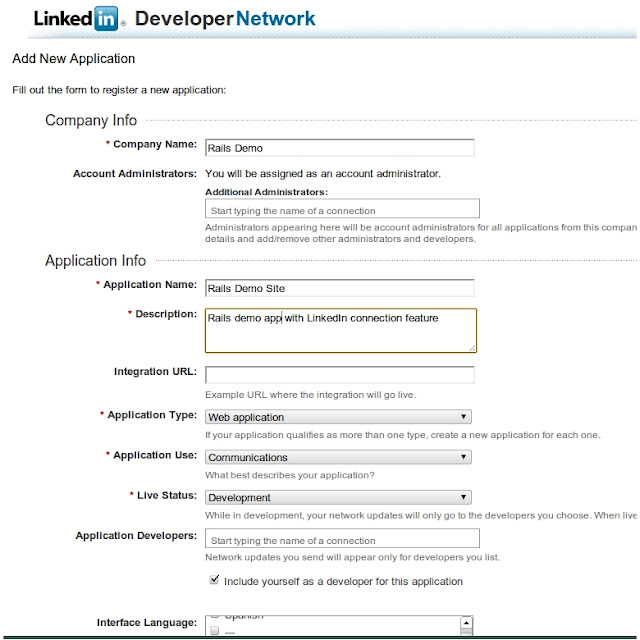
LinkedIn launched its new API in November 2009, allowing any developer brave enough to implement OAuth to integrate with one of the largest social networks around. Seeking an opportunity to really understand OAuth more fully and play around with the LinkedIn API at the same time, I created the LinkedIn connect sample code. This is a sample Ruby on Rails tutorial to demonstrate how you can use the LinkedIn API to authenticate users and pull their profile data into your own website. GETTING STARTED Before you can use the LinkedIn API, you'll need to set up your API keys. Getting Started with the LinkedIn API 1. Where do I begin? Start by navigating to http://developer.linkedin.com . This is Linkedin developer portal where you can read API documentation, collaborate with other developers, and keep abreast of changes to the LinkedIn API. From here, click on “LinkedIn APIs.” 2. Now click on “Request an API Key” 3. After logging in, you’re now presented with an opportunit...

Extending Ruby on Rails Contacts Gem to invite Twitter users

Contacts Gem 是一個能夠從Web Mail服務中匯入聯絡人列表的Rails插件,我們可以擴充它來支援匯入Twitter朋友列表,並發送邀請訊息給他們。 首先必須給Rails應用程式安裝contacts插件,請參考下面這篇文章: Extending Ruby on Rails Contacts Gem to invite Facebook friends 現在打開#{RAILS_ROOT}/vendor/plugins/contacts/lib/contacts目錄,新增一個twitter.rb: 記得添加下面內容至#{RAILS_ROOT}/vendor/plugins/contacts/lib/contacts.rb中: 最後可以打開Rails Console來測試一下:

Extending Ruby on Rails Contacts Gem to invite Facebook friends

Contacts Gem 是一個能夠從Web Mail服務中匯入聯絡人列表的Rails插件,我們可以擴充它來支援匯入Facebook朋友列表,並發送邀請訊息給他們。 首先必須安裝Contacts plugin: $script/plugin install git://github.com/cardmagic/contacts.git 另外我們還需要安裝Json Gem: $sudo gem i jason 另外我們還需要安裝Mechanize Gem來使用其相依的Nokogiri: $sudo gem i mechanize 現在我們可以打開Rails Console來檢查一下: 現在到#{RAILS_ROOT}/vendor/plugins/contacts/lib/contacts目錄下建立一個page_scraper.rb: 然後在同樣這個目錄下新增facebook.rb: 最後編輯#{RAILS_ROOT}/vendor/plugins/contacts/lib/contact.rb添加下面內容: OK!完成了,現在可以打開Rails Console來測試一下: ps.目前聯絡人列表中,分頁的問題尚待解決!

Using contacts gem to fetch contacts from Gmail, Yahoo and Hotmail in Rails

For a long time, the only way to get a list of contacts from your free online email accounts was with proprietary PHP scripts that would cost you $50. The act of grabbing that list is a simple matter of screen scrapping and this library gives you all the functionality you need. 下面是在現有的Rails App裡面,利用Contacts插件來實現匯入GMail,Yahoo! Mail以及Hotmail,AOL Mail等Web Mail服務中的聯絡人列表。 首先我們需要給Rails應用程式安裝contact插件: $script/plugin install git://github.com/cardmagic/contacts.git 或者是以Ruby Gem的方式安裝: $sudo gem i contacts 然後在config/environment.rb中添加下面內容: 我要在邀請朋友的頁面中添加這個功能,所以編輯app/controllers/users/invites_controller.rb: 接下來建立app/views/shared/_contact_list.html.erb,我們會在這個視圖中以checkbox的方式來列出Email服務中的聯絡人列表,讓使用者勾選要發送邀請函給哪些人: 最後編輯app/views/users/invites/new.html.erb視圖,讓使用者選擇要匯入的Email聯絡人列表: 現在可以啟動Mongrel Serever然後在網址攔輸入 http://localhost:3000/users/admin/invites/new 在頁面上選擇要使用的Email服務,並輸入你的帳號密碼,送出之後就可以得到聯絡人列表了!

Integrate Windows Live ID Authentication with Rails Application

圖片
Windows Live ID is the identity and authentication platform for all Microsoft online services, such as Windows Live, Xbox Live, Office Live, etc. Many third-party sites also use Live ID authentication. Formerly known as Microsoft Passport, the service was rebranded to reflect the Windows Live brand, as well as new scenarios and features developed to support Windows Live. Why using Windows Live Authentication? SSO (Single Sign-on) become more popular and important in network security. Just imagine you always login to your own computer, bank account, email and many online accounts just by your smart card and pin code with maximum security without any worry about reminding many passwords, lost or stolen password. Still we are on the road to this goal but the current standard and technology are indicated that we are very close to it. Today even large organizations try to use systems such as Active Directory Federation System (ADFS) to reach SSO. Windows Live ID Web Authentication hel...

Integrating OpenID & Clickpass Authentication in your Rails Application

圖片
OpenID is a service, framework, and protocol that is revolutionizing the realm of user authentication and identity services. Started in 2004 by Brad Fitzpatrick, OpenID is now a mature framework supported by major Internet organizations such as AOL, Google, IBM, Microsoft, VeriSign, and Yahoo. It offers a distributed, reliable, and open way for web sites to authenticate their users and saves web developers from the need to write yet another piece of authentication code. 要在每個使用過的網站建立新的帳號,感到疲累嗎?您總是避免上新網站,是否因為每個網站都要求您建立帳號和密碼? 您是否在電腦螢幕旁貼了一堆密碼提示? OpenID 是一種開放技術標準,可解決所有這類問題。透過 OpenID 技術,您可以使用您的 OpenID 帳號隨意在不同的網站上登入或註冊! 在實作這個功能之前,我們需要安裝ruby-openid這個Ruby Gem以及acts_as_authenticated和restful_authentication這兩個Rails Plugin。 接下來我們要先建立openid的資料表並在現有的Users資料表中添加一個identity_url欄位。建立一個遷移檔來新增資料表,然後編輯這個遷移檔: $ ruby script/generate migration CreateOpenidAuthentication 接下來再來建立一個UserOpenid模型,然後編輯這個新的遷移檔: 然後編輯UserOpenid Model: 接下來編輯#{RAILS_ROOT}/config/routes.rb,設定相關的路徑映射: 註:這裡面的controller必須視你...

Using Yahoo! Browser-Based Authentication with your Rails Application

圖片
Yahoo has released a new product called BBAuth in Sep, 2006, It’s a mechanism for non-Yahoo applications to access Yahoo’s authentication mechanism and user data in a secure manner. BBAuth fixes that problem when it comes to accessing data locked up at Yahoo. Using the tools Yahoo provides, non-Yahoo applications can request a user to sign in to Yahoo and give permission for Yahoo user data to be sent to the non-Yahoo application. 這是二年前做的東西,我們將透過 Yahoo Browser-Based Authentication(Yahoo! BB Auth)這個介面來實作使用 Yahoo! 帳號登入 Rails 應用程式的功能。實作之前需要先安裝 xml-simple 這個 Ruby Gem 套件,以及 Act-as-authenticated 這個 Rails Plugin。 首先建立遷移檔,在 User 模型添加一個一個 yahoo_userhash 欄位: $ ruby script/generate migration AddYahooBBAuthToUsers 實作之前,先來了解一下Yahoo! BB Auth 的基本運作原理: * 當使用者點擊網頁上的 http://你的網址/yahooLogin 連結之後會被重導至 Yahoo!的認證頁面 * 認證成功之後,Yahoo!會傳回一些 information,並導向 http://你的網址/yahooAuth return 回來的其中一個值即是使用者在 Yahoo!與你的 Rails 應用程式聯合產生的 unique id。 若它在我們站上沒有資訊,就準備一個註冊頁面讓使用者填。如果有就用 find_by_yahoo_userhash 找出他...

文章列表

Contact

名稱

以電子郵件傳送 *

訊息 *